Attendance Report
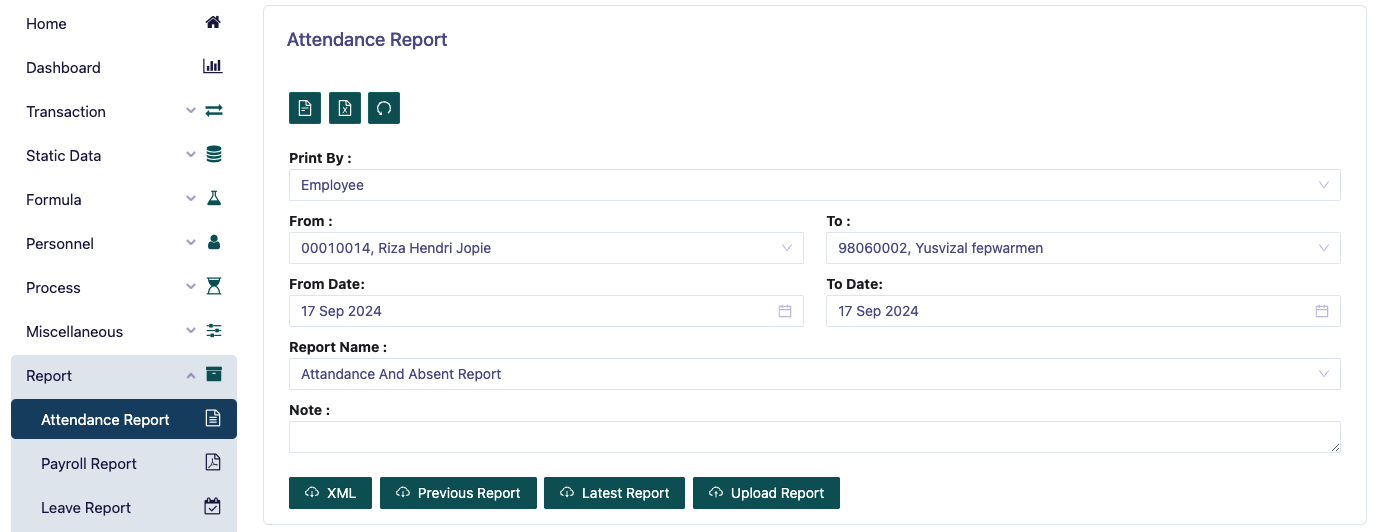
This page is a menu for printing employee attendance reports. You must determine Print By whether based on employee or department.
Then determine the range from a certain Employee ID to the desired one.
Then determine the range from the desired date.
After that, determine Report Name there are several options such as:
Attendance and Absent Report This report is used to display a list of employees who are absent or absent for certain reasons based on their attendance remarks.
Attendance Daily Remark Report This report is used to display a list of employees who are absent or absent for certain reasons based on their attendance remarks per day. This report is almost the same as the Attendance and Absent Report reports, the only difference is in the employee IN OUT slotting, in this report there is no employee IN OUT slotting column.
Attendance Daily Report This report is used to display a list of employee daily attendance.
Attendance Daily Report to Employee This report is used to display employee daily attendance, and can be displayed on the Pisi People app.
Attendance Detail Report This report is used to display attendance details from the selected date range.
Lateness & Early This report is used to display late and early employee details.
Missing Slot This report is used to display employee IN OUT time attendance that is empty.
Overtime This report is used to display employee OT details per day.
Then you can preview the report that will be printed, and download the report in pdf format.
Then you can also download the report that will be printed in xml format if desired.