Payroll Report
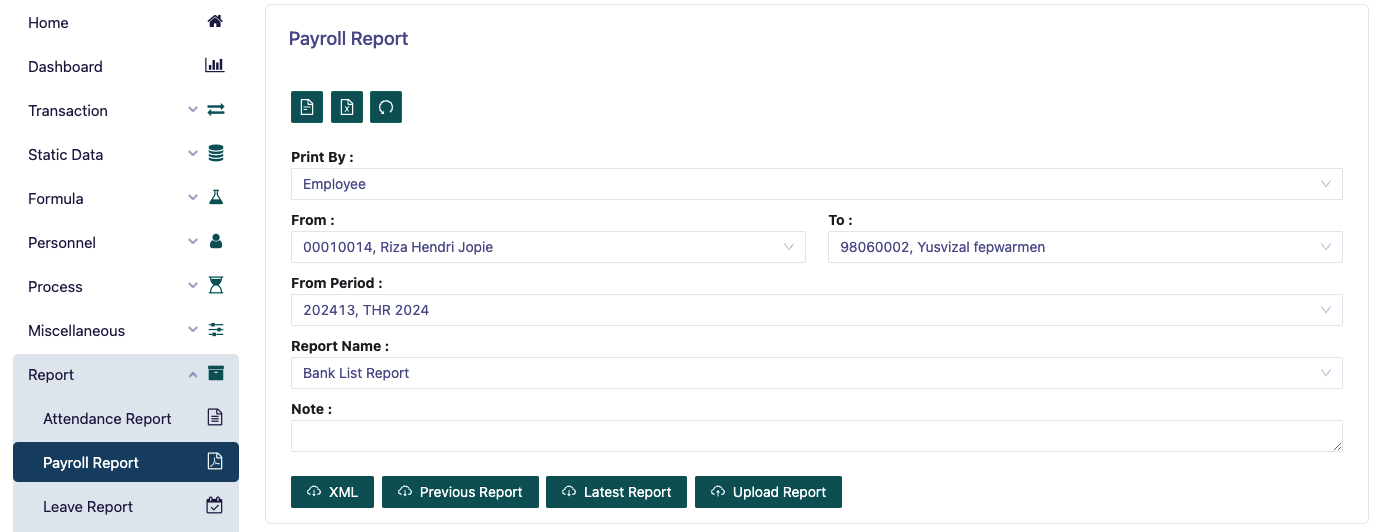
This page is a menu for printing employee payroll reports. You must determine Print By whether based on employee, department, category or religion.
Then determine the range from a certain Employee ID to the desired one.
Then determine from which payroll period you want.
After that, determine Report Name there are several options such as:
Bank List Report This report is used to display a list of employee bank accounts along with the net pay for the payroll period.
BPJS Kesehatan This report is used to display details of employee BPJS Kesehatan contributions for the payroll period.
BPJS Pensiun This report is used to display details of employee pension insurance contributions for the payroll period.
Jamsostek Payment This report is used to display details of employee jamsostek contributions for the payroll period.
Payslip This report is used to display employee payslips for the payroll period.
SeverancePay This report is used to display details of severance pay and severance tax for the payroll period.
Statement Report This report is used to display details of each employee's salary for the payroll period.
Tax Report This report is used to display details of employee salary tax for the payroll period.
Then you can preview the report to be printed, and download the report in pdf format.
Then you can also download the report to be printed in xml format if desired.