Attendance Setup
The first page of the Setup Menu is the Attendance Setup Page, where the menu is divided into General, Machine Setup, and Working Parameters.
General
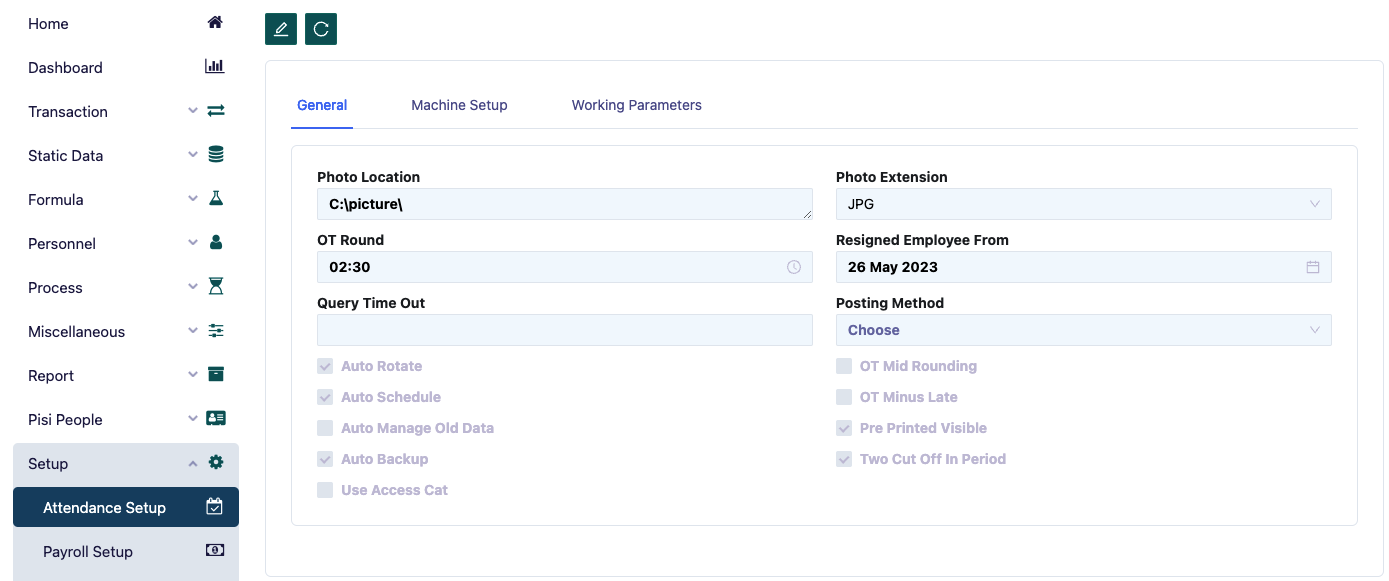
In the General section, several setups must be filled out:
- Photo Location: Specifies the folder where employee photos are stored.
- OT Round: The overtime multiplier to be calculated, for example, 15 minutes or 30 minutes.
- Query Time Out: Includes auto rotate, auto schedule, auto manage old data, auto backup, and use access category.
- Auto Rotate: Leave blank, no longer in use.
- Auto Schedule: Leave blank, no longer in use.
- Auto Manage Old Data: Used to manage old data.
- Auto Backup: Automatically performs a backup.
- Use Access Cat: Access based on category.
- Photo Extension: Choose between JPG or BMP.
- Resigned Employee From: Displays resigned employees in the employee form from a specific date onward, with earlier records hidden.
- Posting Method: Includes OT Mid Rounding, OT Minus Late, Pre Printed Visible, and Two Cut Off in Period.
- OT Mid Rounding: Used for overtime rounding.
- OT Minus Late: A module to set whether overtime will be directly reduced if there is a late entry.
- Pre Printed Visible: Whether to delete temporary files.
- Two Cut Off in Period: Used if the period between attendance and payroll is different.
Machine Setup
In the Machine Setup section, the following setups must be filled out:
- Execute File Location: Currently not in use.
- Machine Operate: The type of machine to be used.
- RTA Date Format: If using RTA 600, specify the format, such as yydddmm or others.
- Current File Extension: The file format produced by the machine (usually in dbf or txt format).
- File Machine Location: Specifies the location where the machine-generated file is stored for data slot purposes. For example, if the machine used is RTA 600, this corresponds to the RTA 600 folder, usually located in C:\RTA600\data.
- Machine: Select the machine to be used.
- Use Proximity Card: Whether to use a proximity card.
- Old File Extension: The file format after being collected by the program.
Working Parameters
Working Parameters are the setup options for the program, which programmatically define the working parameters for Attendance.
In the Working Parameters section, the following setups must be filled out:
- Maximum Left In: 2 hours.
- Maximum Right In: 2 hours.
- Maximum Left Out: 2 hours.
- Maximum Right Out: 7 hours.
- Working Maximum: 18 hours.
- Working Minimum: 1 hour.
- Shift Default: Normal shift.
- Allow Yesterday Slot IN As Today IN: Check the box.
- Use Half Day Normal Before Off For Off Calendar: Check the box.